
Somewhere in the last year, “schema” became one of those words that gets thrown at business owners with no explanation:
You need schema.
Add structured data.
Make sure your site has the right markup or AI won’t find you.
Okay, but what is schema actually?
Here’s the plain version. Schema markup is a layer of hidden labels you add to your web pages that tells search engines and AI tools exactly what your content means, not just what it says. It isn’t visible to your visitors, because it’s written for the machines reading your site rather than the people. And once you understand what it’s actually doing, the whole “you need schema” conversation stops sounding like a sales pitch and starts making sense.
This isn’t going to turn you into a developer; it’s going to make you the owner who actually knows what’s on the invoice when someone says they “added schema to your site.”
A quick clarification before we go further: “schema markup” and “structured data” refer to the same thing. Schema.org is the shared vocabulary that search engines agreed to use, while structured data is the broader category. You’ll see both terms, and they can be (and are) used interchangeably.
What a Search Engine Sees When It Reads Your Page
Let’s start with the problem schema solves. When you look at your services page, you see a headline, a price, a phone number, some hours, a few reviews. You know instantly that “$2,500” is a price, that “(765) 555-0118” is a phone number, and that “4.9 stars” is a rating.
You know all of that because you’re a human and you’ve seen a thousand pages like it.
A search engine doesn’t get any of that for free. It sees text, and it has to guess that the number near the dollar sign is probably a price, that the line near “Hours” is probably when you’re open, that the block of stars is probably a review. Most of the time it guesses right, and sometimes it doesn’t. But “most of the time” is a weak position to be in when you’re competing for the top of a results page.
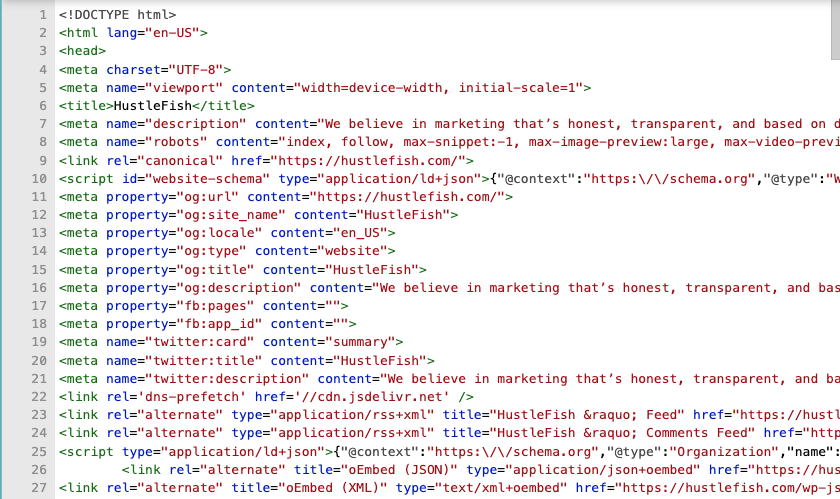
Schema markup removes the guessing. It’s a small block of code, usually tucked in the background of the page, that says in a language the machine understands: this is a LocalBusiness, its name is HustleFish, this is the address, these are the hours, this is the service and this is what it costs, this is a review and here’s who wrote it and what they rated you.
You don’t write any of this in English. It’s written in a structured format (the common one is called JSON-LD) that every major search engine agrees to read.
Think of it like a label on the back of a product: the front of the package is your website, the part people look at. But the label on the back is the part the machines scan, spelling out exactly what’s inside so nobody has to guess.
There are other things you can do to improve your AI SEO as well, beyond just schema (and usually they’ll move the needle more).
Why This Matters More Now Than It Did Three Years Ago
For years, schema was a nice-to-have. It could earn you those richer-looking search results, like the ones with a featured snippet, star ratings, or FAQ dropdowns built into Google. Helpful, but not urgent, and easy to put off.
Then search changed. Google now answers a lot of questions directly at the top of the page with an AI Overview, a synthesized paragraph that responds to the question before you ever click a link. Those AI Overviews now show up in roughly 21% of all Google searches.
At the same time, people started asking ChatGPT and Perplexity the questions they used to type into Google. Those tools mostly aren’t pulling answers out of thin air either. They’re reading the web — often through a process called grounding — where the AI realizes your question is outside what it already knows and goes searching for sources before it answers.
So the question quietly stopped being “will my page rank” and became “can a machine read my page clearly enough to quote it.”
That’s where schema earns its keep. When a search engine or an AI tool can see exactly what your page is, who you are, what you offer, what you charge, and what your customers said, you become an easier source to trust and pull from. When it has to guess instead, you’re competing against every page that makes itself easier to read.
Think about it this way: AI looks at your website through a soda straw and makes its calls based on whatever it can clearly make out. Structured data is really just a way of widening what it can see.
A fair warning, though, because the honest answer matters more than the impressive one: schema is a meaningful signal, not a magic bullet. It will not drag a page from invisible to the top of the results. What it does is help the machines understand and trust a page that already deserves to be found, and we’d rather you know that going in than have someone sell it to you as the thing that fixes your traffic.
And if you want to understand more about how search is evolving because of AI, check out our rundown on how to integrate AEO with traditional SEO strategies.
The Types of Schema That Actually Matter for a Small Business
There are hundreds of schema types in the official vocabulary, and you will never need most of them. For a small or mid-sized business, a few do almost all the work.
The most foundational one is Organization or LocalBusiness schema. It tells search engines the basics of who you are, such as:
- your business name
- your address
- your phone number
- your hours
- your service area
If you serve a specific place, the LocalBusiness schema is what helps you show up correctly when someone searches “web design Indiana” or “marketing service near me.” It’s the digital version of making sure your name and address are spelled the same way everywhere people might look.
FAQ schema marks up the questions and answers on a page so a search engine knows “this is a question, and this is its answer.” This one lines up neatly with how AI tools want their information: a clear question, a clear answer, and no digging required to get from one to the other. And while Google has deprecated use of FAQ schema for search results, there’s no saying that AI tools have followed suit.
HowTo schema does the same thing for step-by-step content. If you publish a guide, it labels the steps as steps so a machine can follow the sequence instead of reading a wall of text and hoping it gets the order right.
If you sell products, Product schema tags the price and availability along with any reviews so those details can surface directly in results; for a service business it matters less, but if you run an online store, it’s doing real work.
Keep in mind, you don’t need all of these. You need the ones that match what’s actually on your pages. A local service business might live almost entirely on LocalBusiness and FAQ schema and never touch the rest, and that’s fine, because matching the markup to the page is the whole game.
Said another way, slapping product schema on a page with no product doesn’t help you; it just hands the machine a label that doesn’t match what’s inside. Which is worse than no label at all.
Where Schema Fits, and Where It Doesn’t
Here’s the part most people selling you on structured data leave out: Schema is a layer on top of a healthy site, not a foundation underneath a struggling one.
If your pages are thin, your content doesn’t answer real questions, and other reputable sites don’t link to you, perfect schema won’t save you. This is because AI tools and search engines primarily pull from pages that already perform well. If your site sits on page 10 of Google, the cleanest structured data in your county isn’t going to surface you in an AI answer, for the simple reason that nobody’s pulling from page 10 in the first place.
The order that works:
- Get the fundamentals right first
- Make sure your pages can actually be crawled and show up on Google
- Write content that answers the questions your customers are actually asking
- Organize it into clear sections with clear headings
Then add schema so the machines can read all that good work without guessing.
Do it in that order and every piece compounds, because the same structured, well-organized content that earns a Google AI Overview citation is the content that ranks in regular search too.
You’re not doing two jobs. You’re doing one job well and letting it pay off in both places.
How To Know if Your Schema Is Working
Once schema is on your site, you need to verify it’s actually being read correctly. There are two tools worth knowing.
Google’s Rich Results Test lets you paste any URL and see exactly what structured data Google detects on that page, and whether it’s valid. If there are errors, it’ll tell you what they are. This is the first place to check after schema gets added to your site.
The schema.org Markup Validator is the more comprehensive option — it checks your markup against the full schema.org vocabulary rather than just what Google supports. If your schema looks clean in the Rich Results Test but something still feels off, run it through the validator too.
A common source of confusion: passing validation doesn’t guarantee rich results will appear in search. Google decides whether to show rich snippets based on factors beyond just valid markup — content quality, site authority, and relevance all play a role. Valid schema is a requirement, not a guarantee. And if your schema was recently added, give it a few weeks before drawing conclusions — Google needs time to recrawl and process the changes.
What to Actually Do With This
You don’t need to learn JSON-LD. You need to know enough to ask questions — and now you do.
If someone built your website, ask them what schema is on it right now. A well-built site usually has the basics already in place, like Organization or LocalBusiness, and if you’re on WordPress, a lot of schema gets handled by SEO plugins working in the background. Which is exactly why it often feels invisible even when it’s there.
If you’re the one publishing content, structure it the way both people and machines like to read it: lead with the answer, use headings that match real questions, and keep your FAQ sections genuinely useful, because that structure is what schema then labels. Remember: good structure first, markup second.
And if a vendor ever pitches “schema markup” as the fix for slumping traffic, you now know enough to push back and ask what’s actually wrong first. Schema helps a healthy site be understood. It doesn’t make an unhealthy one rank on its own. The honest version of that is less exciting than the pitch, which is exactly why it’s worth knowing before you pay for it.
Deciding Between Schema Plugins, Manual Coding, or Hiring It Out
Most small businesses on WordPress don’t need to write a single line of JSON-LD by hand. SEO plugins like SEOPress, Yoast, and RankMath handle the most common schema types automatically — LocalBusiness, Article, and basic organization details get added in the background when you configure the plugin correctly.
Where plugins fall short is on more specific schema types — FAQ schema tied to actual page content, Article schema with accurate publish dates, or any custom schema for specific service types like legal practices, medical providers, or local service businesses with unique offerings. Those usually need to be added manually, either by dropping JSON-LD directly into the page HTML or using a code snippets plugin.
The honest decision framework:
- If you’re on WordPress and have a basic SEO plugin configured, you probably have more schema than you think. Check the Rich Results Test before assuming you have nothing.
- If your site has FAQ sections, blog posts, or service pages without structured data — that’s where manual additions are worth the effort.
- If schema is being pitched to you as a standalone deliverable at significant cost — ask for a before/after comparison using the Rich Results Test. The work should be verifiable.
For most small businesses, the highest-leverage move is making sure LocalBusiness and FAQ schema are implemented correctly, then leaving the rest alone until there’s a specific reason to add more. At that point, it’s smart to chat with an SEO service provider of some kind to see what best practices are before tinkering with the back end of your website.
How Hustlefish Handles Schema
When we do SEO work for clients, schema is part of the foundation, not an add-on or bandaid fix. We verify what’s already on your site, talk about what needs to be fixed (if anything), and add more complex schema types as needed.
If you’d like a straight answer on what’s on your own site and whether it’s set up right, that’s a conversation we’re always happy to have.
Frequently Asked Questions
What is schema markup?
Schema markup is a layer of hidden code added to web pages that tells search engines and AI tools exactly what the content means — not just what it says. It uses a shared vocabulary called schema.org, written in a format called JSON-LD, that Google, Bing, and other search engines all agreed to read. It’s not visible to visitors; it’s written for the machines reading your site.
What is the difference between schema markup and structured data?
They refer to the same thing. Structured data is the broader category — any code that organizes information in a way machines can parse. Schema markup specifically refers to the schema.org vocabulary used to write that structured data. The terms are used interchangeably, and both mean the same concept in practice.
Do I need schema markup?
For most small businesses — yes, the core types are worth having. LocalBusiness schema helps Google understand your name, address, hours, and service area. FAQ schema can get your answers pulled directly into search results. Article schema helps Google evaluate your blog content. These aren’t urgent emergencies if they’re missing, but they’re meaningful signals that help the machines understand and trust your site.
What does schema markup do for SEO?
Schema markup doesn’t directly improve your rankings, but it helps search engines and AI tools understand your content more accurately — which can earn you richer-looking search results (star ratings, FAQ dropdowns, pricing), make you a more likely source for AI-generated answers, and improve click-through rates from search results even when your position stays the same.
How do I know if schema markup is working?
Run your URL through Google’s Rich Results Test. It shows you exactly what structured data Google detects and whether there are any errors. For a more thorough check, run it through the Schema.org Markup Validator. Note that valid schema doesn’t guarantee rich results will appear — Google decides that based on content quality and relevance, not just valid markup.
What schema types does a small business actually need?
Start with LocalBusiness schema (your name, address, phone, hours, service area) and FAQ schema on any page that has a question-and-answer section. If you publish blog content, add Article schema. Everything else is secondary. Match the markup to what’s actually on your pages — adding schema types that don’t reflect your content doesn’t help and can create errors.
Should I use a plugin or hire someone to add schema markup?
If you’re on WordPress, a properly configured SEO plugin handles the most common schema types automatically — check the Rich Results Test first before assuming you have nothing. For FAQ schema tied to specific page content, Article schema with accurate dates, or any custom schema, those usually need manual additions. If schema is being quoted to you as a significant standalone cost, ask for a before/after comparison using the Rich Results Test so the work is verifiable.
Why isn’t my schema showing up in search results?
A few common reasons: the schema was added recently and Google hasn’t recrawled the page yet (give it a few weeks), the schema has validation errors (check the Rich Results Test), or Google has decided the page doesn’t qualify for rich results based on content quality or relevance. Valid markup is required but not sufficient — the page itself needs to meet Google’s quality threshold for the rich result type you’re targeting.
How does schema markup help AI tools like ChatGPT find my business?
AI tools that search the web before answering — a process called grounding — read your pages the same way search engines do. When your content is clearly labeled with schema markup, you become an easier source to identify, trust, and pull from. Schema won’t surface a page that doesn’t already perform in search, but it removes ambiguity for AI systems trying to understand what your page is about and who you are.