

Showing up on the first page of Google is critical for growing e-commerce brands, especially in competitive industries like apparel, cosmetics, or home decor.
Using brand bidding to be first on Google when people search for your brand is easy. But did you know you can also use it to appear first when people search for your competitors?
What is Brand Bidding?
Brand bidding is the practice of bidding on keywords that use your competitor’s brand in paid search ads. It’s also known as PPC brand bidding or trademark bidding.
By bidding on branded terms, you pay to have your brand name appear above your competitors on search engine results pages (like Google).
It’s a great way to put your name in front of a competitor’s customer base and convert them into potential customers for your business. You also build brand awareness by placing yourself in front of customers who are already looking for the products or services you offer.
How to use Brand Bidding on your Competitors’ Google Ads
To bid on your competitors’ brand, there’s a catch: you have to include their name somewhere on your website.
Why?
Because you can only target keywords in Google Ads that appear somewhere on your website. That’s why you’ll often see brands write blog posts comparing their brand to their largest competitor.
For example, a Google search for the CRM (customer relationship management) company Pipedrive shows they have the #1 organic listing on Google. But right above them is a direct competitor: monday.com.
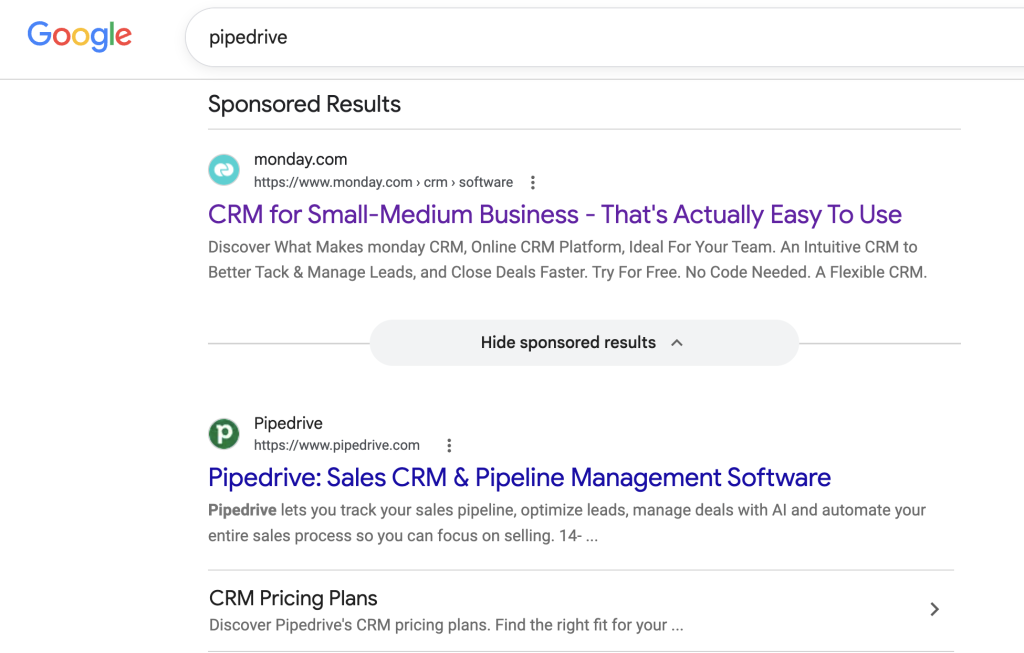
And if you look monday.com, you’ll see they have a page dedicated to comparing their service to Pipedrive:
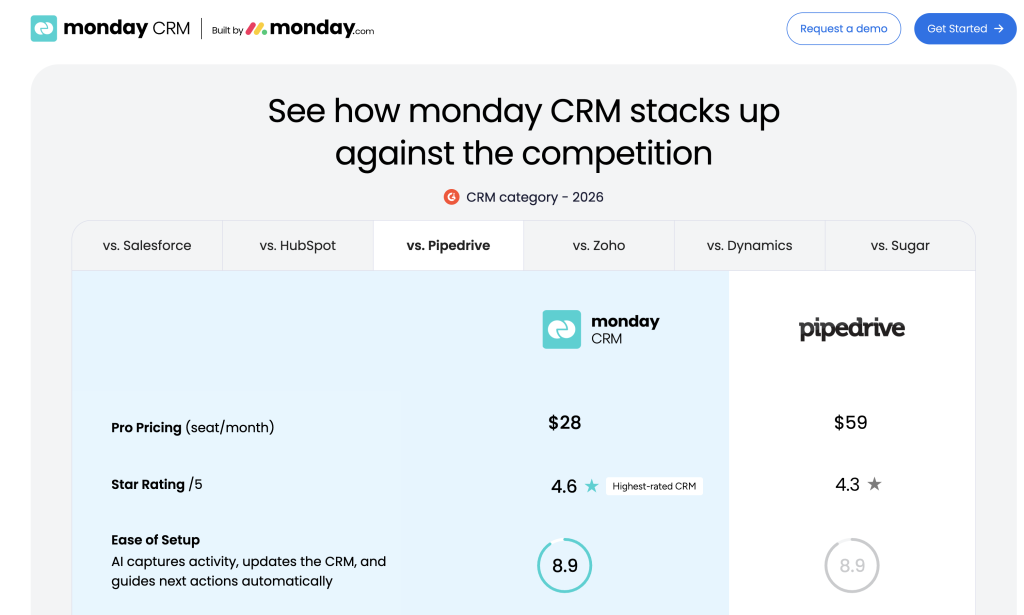
You can use this same tactic on your website by publishing a blog post or landing page that includes your competitor’s name.
Then it’s time to set up your Google Ads.
How to Set Up Brand Ads Against Your Competitors
First, if you’re new to Google Ads, here’s how to set up a Branded Search campaign:
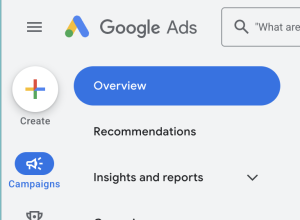
Go to ads.google.com. In the top left, click the colorful Create plus sign, and then select “Campaign.”
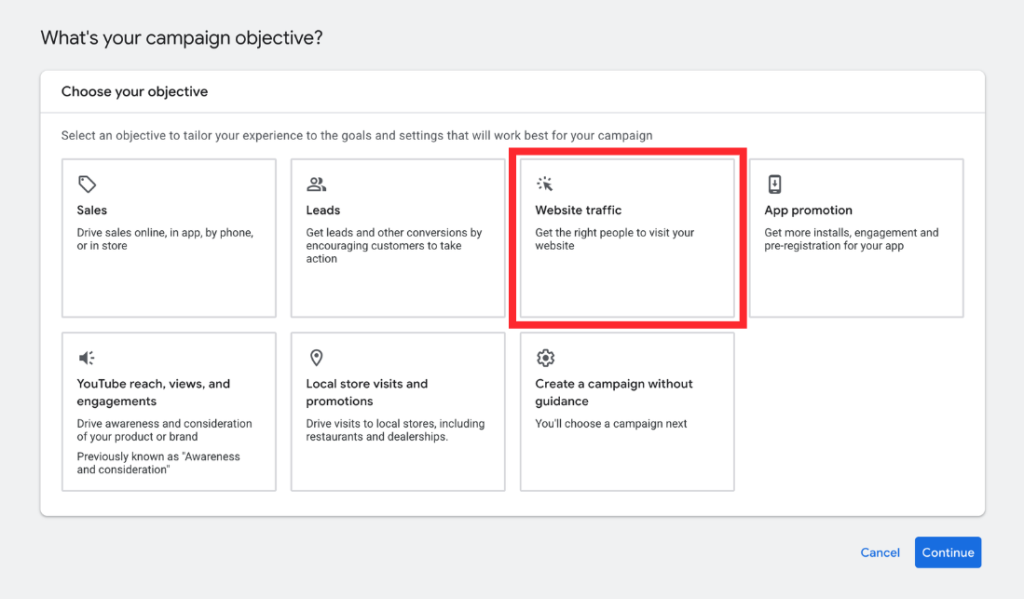
On the next screen, click “Website traffic” and click continue. Note: Depending on your account, you may see different options here, and a second module with conversion goals might pop up. You can adjust the settings if you want to.
When you click continue you’ll see more options populate in a new module. Choose “Search” and then continue.

When the next module populates, choose a name for your campaign and add the URL you want to use. This is the page users will go to when they click on your ad from Google. Click continue.
On the next page, you’ll set up your full campaign. We won’t go into every step, but these are the key settings for a brand bidding campaign:
- Bidding focus. Google might suggest something by default (usually maximize conversions), but for brand bidding, you’ll usually want “Impression Share” instead.
- Ad groups and keywords. This is where you add your competitor’s name and variations.
For example, if your brand is “ABC Apparel,” and your competitor is “XYZ Wear,” your keywords may look something like:
- ABC Apparel vs. XYZ Wear
- Difference between XYZ Wear and ABC Apparel
- XYZ Wear Alternatives
The more variations of search terms you use, the higher likelihood of stealing your competitor’s market share.
A word of advice: if you bid on competitors’ keywords, make sure your ads are respectful and don’t badmouth their brand. First of all, ads that talk poorly about other brands rarely perform well. But more importantly, it’s a great way for that brand to retaliate or report you to Google (which can have severe consequences for your business).
Once your ads are set, you can sit back and monitor the performance of your campaign to see if it’s getting the results you want. Or, if you want advice on the best way to advertise your business, check out our paid ads service.
How to Protect Your Brand From Competitors
While brand bidding can be a great way to boost your marketing efforts, you might wonder what’s stopping your competitors from using the same tactics against you.
The short answer is, you can’t.
But there are things you can do to make their efforts less successful, such as:
- Bid on your own brand. This usually makes sense for your marketing strategy for other reasons too, but running ads with your own brand name can help you maintain control over how your brand appears in search results.
- Monitor your brand. By keeping tabs on your brand name online—especially as it appears in PPC ads—you know who is bidding on your brand’s keywords and how it’s affecting your online visibility. You can use tools like Google’s Ad Auction Insights to help you keep track.
- Create interesting ads. If your ad copy outshines your competition, it won’t matter how many ads they run against you. Use unique selling points, special offers, or creative calls-to-action that make your brand more appealing.
- Leverage SEO. If you combine SEO and paid ads, you can take up more real estate on the search engine results pages. This leaves less room for competitors to get a foothold and makes your brand appear more prominently in a search query.
Using brand bidding isn’t just defense either. Branded searches convert into paid ad clicks about 33% more often than unbranded ones, according to iPullRank’s analysis of 13 billion Google searches.
Keep in mind a well-rounded marketing strategy is the best way to grow your business. Spending too much time (and money) focused on your competitors isn’t a strategy that will succeed long term.
Pros and Cons of Brand Bidding for Competitor Keywords
Like any marketing strategy, there are pros and cons to bidding on your competitors’ keywords. Keep these in mind when deciding if this is a strategy you want to pursue:
| Pros | Cons |
| High-intent search traffic. Like we mentioned earlier, by placing your name next to businesses similar to yours, you’re putting yourself in front of an audience who is already looking for your products or services. | Encourages bidding wars. If your competitor is tracking their brand, they’ll notice that you’ve bought ads against their brand. You run the risk of them retaliating and bidding on your brand. |
| Increased brand awareness. You may have a better product, but if people haven’t heard of you, they’ll go with what they know. Brand bidding lets you associate your business with bigger or more well-known names in your industry. | Low click through and conversion rates. While you might convert some of your competition’s customers, you also run the risk of losing out to brand loyalty. This is especially true in industries such as fashion and shopping. |
| Less competition. Brand bidding is not a strategy everyone uses, so there may be less competition in your industry. This means you can run your brand campaigns for less than ones run on other keywords. | Quality score impact. If your ads have few impressions or are deemed not relevant to the brands you bid on, your quality score can suffer. This means your ads will be more expensive to run or have lower positions on Google. |
Find a Paid Ads Strategy that Wins
This is a simplified version of competitor keyword targeting, and it can get infinitely more complex.
If you’d like help setting up your Google Ads in a way that allows you to capture your competitors’ market and prevent them from doing the same to you, get in touch with our team and we’ll share all the dirty details! (And good news — your discovery call is free).
Frequently Asked Questions About Brand Bidding
What is brand bidding?
Brand bidding is a PPC strategy where you bid on branded keywords — either your own or a competitor’s — so your ad shows up when someone searches that specific brand name.
Is it legal to bid on a competitor’s brand name?
Yes. Google Ads allows bidding on a competitor’s trademarked name as a keyword. You generally can’t use their trademark in your actual ad copy without permission, so check Google’s trademark policy before you launch a campaign.
Can competitors bid on my brand name?
Yes, and it happens more than most business owners realize. That’s exactly why defensive bidding — buying ads on your own name — is worth doing even if you already rank #1 organically.
What’s the difference between brand bidding and defensive bidding?
Brand bidding on a competitor’s name is offense — you’re going after their audience. Defensive bidding is bidding on your own name so a competitor (or anyone else) can’t take that ad slot instead.